
Credits Page
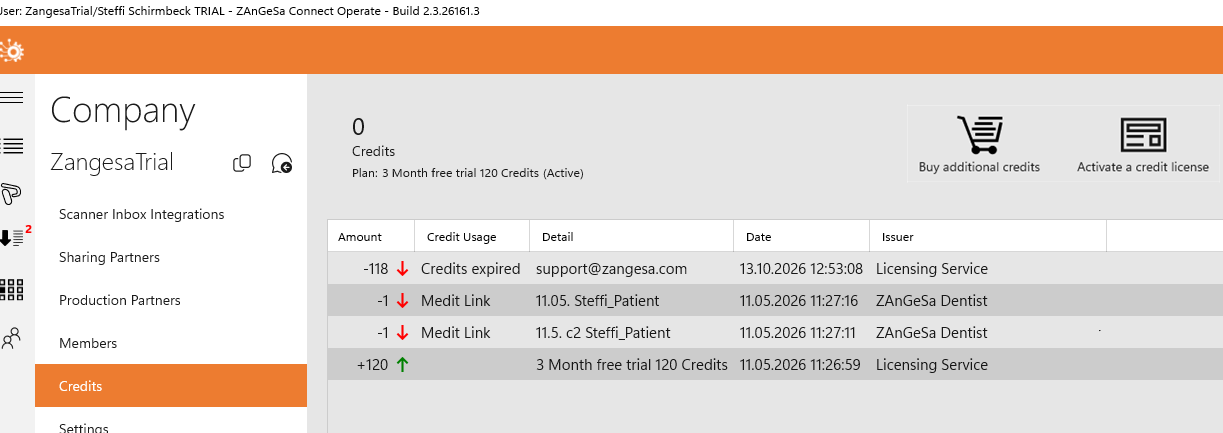
The Credits page provides an overview of your company’s credit balance and all related activity.
You can find more information about credits on the Credits and Subscription Model page.
Core idea: Monitor your available credits, track usage, and access actions such as purchasing or activating additional credits.
Overview
The Credits page is located in the Company submenu. At the top of the page, you can see the number of currently available credits. If the subscription has been cancelled, the page also shows the expiry date of the remaining credits. At the top of the page, you can see your current credit balance. If no active subscription exists, the expiry date of remaining credits is also displayed.
Available actions
- Buy additional credits – Opens the WebShop to purchase credits or manage subscriptions
- Activate a credit license – Add credits from a license key (e.g. promotion or campaign)
Credit activity table
The table shows all credit additions and usage entries. It can be sorted by all columns.
- Amount – Number of added or consumed credits
- Credits Usage – Type of usage (e.g. IOS case, design service)
- Detail – Related case, project, or additional info
- Date – When the transaction occurred
- Issuer – System or user who triggered the action
Warnings
The system can notify your company when limits are reached:
- Low credits
- Low storage
- No remaining storage
Admins may receive email notifications. The Case Inbox can also display warnings.
What happens if credits or storage run out?
- New case collection stops
- IOS synchronization is interrupted
- Action is required to continue operation
Resolution options
- Buy additional credits
- Upgrade your subscription plan
- Delete old cases to free storage