
Credits
The Credits page and the related webshop allow your company to manage the commercial side of the IOS inbox usage.
Core idea: Track credit usage in detail. Use subscription plans for your usual case load and purchase additional credits whenever you need extra capacity.
What are credits used for?
Credits are used for IOS-related case processing or design services within the ZAnGeSa Shark Studio.
In general, a credit is consumed when a new IOS case is collected and made available for your company workflow or a case is exported via the ZAnGeSa Shark Studio.
Credits page
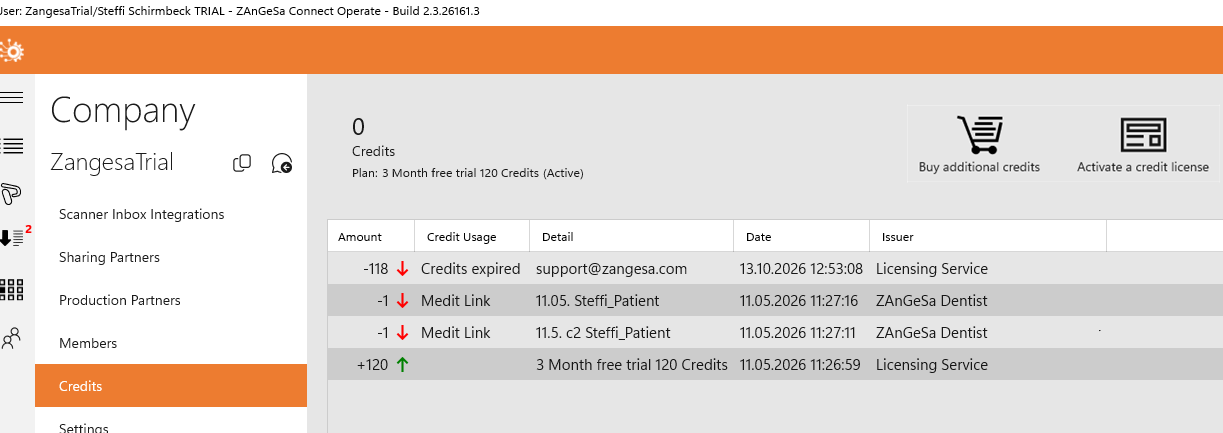
The Credits page is located in the Company submenu and provides an overview of your company’s credit balance and related credit activity. At the top of the page, you can see the number of currently available credits. If the subscription has been cancelled, the page also shows the expiry date of the remaining credits. Credits expire one year after the last credits were added to the company account.
At the top of the page, there are two available actions:
-
Buy additional credits to open the WebShop and purchase extra credits. Plans with more credits also include more allocated cloud storage.
- Activate a credit license to add extra credits, for example if you received a credit license during an expo or through a marketing campaign
The page also contains a table that shows all credit additions and credit consumption entries. The table can be sorted by all columns.
The available columns are:
- Amount – the number of added or consumed credits
- Credits Usage – the type of usage, for example an IOS case or a ZAnGeSa Shark Studio design service
- Detail – the name of the related case or project, or additional information
- Date – when the credits were added or consumed
- Issuer – the service or user that initiated the action, for example in the case of a Shark Studio design service
WebShop
A subscription plan provides a defined monthly credit amount together with a corresponding storage capacity. Credits are added automatically on each subscription renewal date.
Credit rollover limit
Unused credits from the active subscription plan can be transferred to the next month, but the rollover is limited. Plan credits can accumulate only up to three times the monthly credit amount of the active plan.
For example, if the company uses a plan with 25 credits per month, the maximum number of transferred plan credits is 75. If this rollover limit has already been reached, no new monthly plan credits are added until the credit balance falls below the limit.
Additional credits purchased through the WebShop are not blocked by this rollover limit. However, new credits from the subscription plan are added again only when the company’s credit balance is below the plan rollover limit.
Buying extra credits
If your company needs more credits before the next renewal, you can purchase additional credits through the WebShop or switch to a higher plan.
This is useful when:
- scanner case volume is temporarily higher than usual
- you want to avoid interruptions in collection
- your team needs immediate additional capacity
How to buy credits
- Open the Credits page or the webshop link shown in the product
- Review your current license status, purchases, and usage
- Select the additional credit option or plan change you want
- Complete the purchase in the WebShop
- Return to the Credits page and verify the updated balance
What you can buy
Depending on the enabled commercial model, your company may be able to:
- start a subscription
- upgrade to a higher subscription plan
- purchase one-time additional credits
When to buy additional credits instead of upgrading the subscription plan
Buying additional credits is usually a good option when the higher demand is temporary.
Examples include:
- a short-term increase in scanner traffic
- onboarding of a new clinic
- a temporary backlog that increases incoming case volume
If your company regularly reaches the limit, upgrading to a larger plan may be the better long-term option.
Low credits and low storage warnings
The system can warn your company before limits become critical.
- Low credits
- Low storage
- No remaining storage
Admins may receive email notifications when limits become low.
The Case Inbox can also show proactive warnings so the team can react before collection stops.
What happens if credits or storage run out?
If your company runs out of credits or available storage:
- new case collection stop
- incoming IOS synchronization is interrupted
- action is required before normal operation continues
Resolution options
- Buy extra credits through the webshop
- Upgrade the plan
- Delete old cases to free storage space
Trial and activation
When an IOS inbox connection is activated for the first time and the first case is fetched, the company automatically receives a trial license. This trial includes 120 credits for one month and can only be activated once per company.
After the trial period ends, or if all trial credits are used earlier, a paid option must be activated through the WebShop.
Best practice
- Monitor remaining credits
- Watch storage trends
- React to warnings early
- Use one-time purchases for short peaks
- Upgrade the plan if high consumption becomes normal